
Quick Summary
Outsourced drafting usually shortens project turnaround, but the gain depends on how the work is scoped and handed off. Clear inputs, agreed file standards and a fixed review window shorten the schedule, while the timeline of each task depends heavily on its scope.
- Many drafting delays come from waiting for revisions, clarifications and reviewer comments, not from drafting itself.
- Clean PDFs, dimensioned sketches and a single source of truth reduce questions and shorten delivery.
- Sharing layer names, title blocks and plot settings from the start makes the first delivery much closer to final.
- A fixed review window, such as 24 hours, keeps work moving across time zones.
- Write a scope document and a handoff checklist before starting, and start with one pilot project.
Table of Contents
- How Long Does Outsourced CAD Drafting Really Take?
- Pros and Cons of Outsourced Drafting Versus In-House Staff
- Architectural Drafting Outsourcing Best Practices for Faster Delivery
- Integrating Outsourced CAD Drafting Into Your Workflow
- Quality Assurance, Revisions and Measuring ROI
- Choosing a Drafting Partner and Starting Your First Project with Drafting Helpers
- Frequently Asked Questions
How Long Does Outsourced CAD Drafting Really Take?
Last Updated: November 23, 2026
Outsourced drafting usually cuts turnaround time, but the gain depends on how the work is scoped and handed off. Outsourcing can shorten the schedule for some drafting work when a remote team is available for extended hours. Outsourced drafting schedules vary by provider, so confirm first-delivery dates and review cycles directly with Drafting Helpers.
Many architecture firms find that drafting delays come from waiting, not from the drafting itself. A drafter sits idle while a sketch is revised, a file standard is clarified, or a reviewer returns comments days later.
Typical turnaround benchmarks by task type
Turnaround depends heavily on the task. Simple tasks move quickly, while full BIM models take longer because they carry more information per sheet. Confirm current timing with Drafting Helpers for your specific scope.
| Task type | Typical turnaround (qualified) | Best practice |
|---|---|---|
| Redlines and markup cleanup | Same day to 2 days | Send marked-up PDFs with clear notes |
| Conversion of PDF sketches to CAD | 2 to 5 business days | Supply scale and dimensioned sketches |
| Floor plans and elevations (CAD) | 3 to 7 business days | Confirm layer and file standards first |
| Construction document sets | 1 to 3 weeks | Lock scope and milestones before starting |
| BIM modeling (Revit or ArchiCAD) | 2 to 6 weeks | Agree on level of development up front |
A common mistake is treating these ranges as fixed. A large sheet set with many details takes longer than a single plan, even if both are labeled "drafting." Plan around the scope, not the label.
What drives the timeline up or down
Three factors move the schedule most. The first is input quality. Clean PDFs, dimensioned sketches and a single source of truth reduce questions. Missing dimensions create a loop of queries that can add days.
The second is file standards. When the drafting team knows your layer names, title block, and plot settings from the start, the first delivery is much closer to final. Without them, expect at least one cleanup round.
The third is review speed on your side. Drafting work can stop while a principal reviews a set. Setting a fixed review window, such as 24 hours, keeps the work moving across time zones.
Pros and Cons of Outsourced Drafting Versus In-House Staff
Outsourcing is not automatically better than in-house drafting. It suits some firms and workloads more than others, so the trade-offs matter.
The main advantage is capacity. An in-house team has a fixed headcount, so a spike in projects creates backlog. Outsourced drafting can be scaled up or down with workload, which may help firms that see uneven demand. Cost is another factor.
The trade-offs are real. Communication takes more effort when the team is in a different time zone. Institutional knowledge of your projects can take time to build, and a new drafter needs onboarding.
The honest answer is that outsourcing works best for routine production work with clear standards. It works less well for design judgment, client-facing coordination or highly confidential work that must stay in-house.
Architectural Drafting Outsourcing Best Practices for Faster Delivery
Faster delivery comes from preparation. Most of the gains described depend on a clear scope and a disciplined handoff.
Writing scope, file standards and a handoff checklist
Start with a written scope. List the sheets or models to be produced, the software and version, the file formats required, and the milestones for the first delivery and the checked files. A short scope document prevents the most common dispute, which is disagreement over what "complete" means.
Next, define file standards. Include layer conventions, naming rules, title block templates, and plot settings. Attach a sample drawing where possible.
Finally, use a handoff checklist. A practical list includes the following:
- Scale and dimensioned sketches or PDFs attached
- Software version and file formats confirmed
- Layer and naming standards shared
- Title block template provided
- Point of contact and review window set
- Confidentiality terms agreed in writing
Setting service-level targets and revision rules
Service-level targets turn vague speed promises into measurable goals. Examples include a first-delivery date, a maximum number of revision rounds, and a response time for questions. Set these in writing before work begins.
Revision rules matter as much as deadlines. Define what counts as a revision versus a change in scope. Most disputes about delays come from unclear revision boundaries, not from drafting quality.
Integrating Outsourced CAD Drafting Into Your Workflow
Integration is where many outsourcing efforts succeed or fail. The drafting team needs to fit into the way your firm already works, not the other way around. A practical end-to-end workflow turns vague coordination into a repeatable process that shortens turnaround.
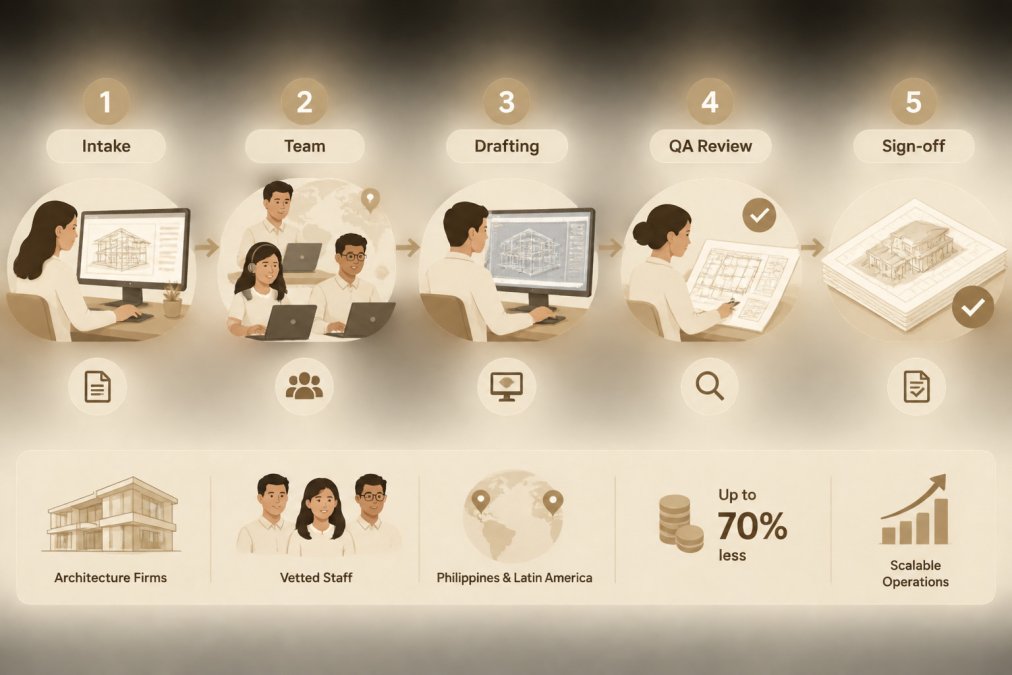
A five-stage workflow from intake to sign-off
Most firms that see consistent speed gains follow a similar sequence. The stages below are a template you can adapt to your project management style.
- Intake and scoping. The project lead completes a short intake form: sheet list, software version, file standards, deadline, and the name of the in-house reviewer. This takes 15 minutes and prevents days of back-and-forth later. Attach all reference files to a single shared folder link.
- Task assignment and kickoff. The drafting provider assigns a lead drafter and confirms receipt within one business day. A 15-minute kickoff call or written confirmation covers priorities, open questions, and the first-delivery date. For recurring work, a standing weekly kickoff slot keeps momentum.
- Production and checkpoint. The drafter works in agreed increments. For multi-sheet sets, require a checkpoint at roughly 50% completion, a low-resolution PDF or screenshot, so your team can catch layout or standard errors before the full set is built. This single step often saves a full revision round.
- Internal review and markup. Your reviewer checks the delivery against the scope and file standards using a standard markup template. Consolidate all comments into one marked-up PDF rather than sending comments in multiple emails. Set a fixed review window, such as 24 hours for small sets or 48 hours for full construction documents.
- Revision and final approval. The drafter addresses markups and returns the revised set with a revision log that lists each comment and its resolution. Final approval is a written sign-off from the named reviewer, which triggers archiving of superseded files.
Communication cadence and time-zone overlap
Begin with a single point of contact on each side. Route all questions through that person to avoid conflicting instructions. Set a regular communication cadence, such as a short daily message or a weekly call, that overlaps with working hours on both sides.
A common pattern is a 30-minute daily stand-up during active production, replaced by a weekly call during slower periods. Written updates should follow a standard format: what was completed, what is next, and what is blocked. This makes status visible without lengthy meetings.
Watch out: if your project management tool and the drafting team's tools do not connect, status updates become a manual chore. Agree on one tracker before the first project starts, and require the drafter to update it at each checkpoint rather than sending status by email. For setting up scope and handoffs, see how to outsource BIM modeling in seven steps.
File standards and version control
Use a shared folder structure and a version-control habit. Every file should be named consistently, for example, ProjectNumber_SheetNumber_RevisionDate.dwg, and superseded versions should be archived in a separate folder rather than overwritten. This keeps the team working from the correct drawing and makes it easy to trace which revision was reviewed.
A handoff checklist for each stage prevents the most common delays. Before production begins, confirm that scale and dimensioned sketches are attached, software version and file formats are confirmed, layer and naming standards are shared, the title block template is provided, the point of contact and review window are set, and confidentiality terms are agreed in writing. At the review stage, confirm that the delivery matches the scope, the revision log is complete, and the next milestone is scheduled.
Quality Assurance, Revisions and Measuring ROI
Speed means little if the work needs heavy correction. A structured quality assurance process catches errors before they reach your client and keeps revision cycles short. The mechanisms below turn quality from a general hope into a measurable system.
Review gates and markup conventions
Set at least two review gates for any multi-sheet delivery. The first gate is an internal check by the drafting provider before the file leaves their office: dimensions against the sketches, title block accuracy, layer structure, and plot settings. Ask the provider to confirm in writing that this check was completed.
Use a consistent markup convention so comments are unambiguous. A common approach is color-coded PDF markups: red for errors that must be fixed, yellow for questions, and green for approved items. Require the drafter to respond to every markup item in a revision log, stating what was changed or why it was not. This log becomes the record for final approval and reduces repeat comments.
Version control and error tracking
Version control is part of quality, not just file management. Every delivery should carry a revision number and date in the file name and title block. Superseded files are archived, never deleted, so you can trace when an error was introduced. If a dimension error appears in a later revision, the archive shows whether it came from the sketch or the drafting.
Track revisions as a metric. Log each revision round with the number of markup items, the category of error (dimension, layer, annotation, title block), and the time to resolve. If the same category appears repeatedly, update the file standards or the scope document rather than correcting it each time.
Watch out: if revisions are tracked only in email threads, patterns are invisible. A simple shared spreadsheet with one row per markup item is enough to start.
Measuring return on investment
Measuring return on investment goes beyond the hourly rate. Compare the total cost of the outsourced work with the in-house alternative, and include the value of time saved on backlog, the reduction in overtime, and the projects that can now be accepted.
A practical method is to record four baseline metrics before outsourcing: average turnaround days per sheet set, revision rounds per project, in-house hours spent on drafting, and backlog in weeks. After three months, record the same metrics. Present the comparison in a simple table to partners or clients; the numbers make the case better than anecdotal impressions.
Include the cost of coordination time, the project lead's hours spent on intake, review, and communication, in the outsourced total. Even with that included, the comparison is usually favorable for routine production work, but the honest calculation prevents surprises.
Choosing a Drafting Partner and Starting Your First Project with Drafting Helpers
Choosing a partner comes down to a few checks. Ask for examples of work in the software you use, such as AutoCAD or Revit. Confirm how the provider handles confidentiality, what the review and revision process looks like, and how it screens its drafters.
Start small. Send one well-scoped set of drawings as a pilot, with a clear checklist and a defined review window. Use the results to decide whether to expand.
Drafting Helpers provides remote architectural drafting support for architecture firms, with pricing and engagement details available on its website. Reviewing the current options there is the fastest way to see whether the model fits your workload. Starting with a single pilot project lets your firm test the process on real work before committing further.
Frequently Asked Questions
How does outsourcing architectural drafting impact project timelines?
Outsourcing moves routine drafting work off your in-house team so design staff can stay focused on decisions that drive the schedule. Timelines improve most when the scope, file formats and approval milestones are defined before the first file is sent. Without those inputs, handoffs slow down and revisions stack up. Ask any provider for a first-delivery date and a review cycle, and confirm how each is measured. Drafting Helpers can walk you through how these steps apply to your project; current pricing and onboarding details are on the Drafting Helpers website.
What are the best practices for managing remote drafting teams?
Set a regular communication cadence, such as a daily check-in and a shared task tracker, so questions are answered within the same working day. Keep one point of contact on each side. Document file standards, naming conventions and layer rules in writing, and share them before work begins. Overlap in working hours matters, so confirm which hours your team and the drafters share. Review the first deliverable closely, give specific feedback, and use it to refine the brief for later work.
How can firms ensure quality control when outsourcing CAD work?
Build quality checks into the workflow rather than relying on a final review. Require a checklist for each deliverable covering title blocks, dimensions, annotations, layer organization and file format. Have your own staff spot-check a sample of sheets at each milestone. Agree on how many revision rounds are included and what counts as a revision versus a change in scope. Clear acceptance criteria make quality measurable and keep disagreements short.
What are the primary risks of outsourcing drafting and how do you mitigate them?
The main risks are unclear scope, inconsistent file standards, weak communication and data exposure. Mitigate scope risk with a written brief and sample files. Reduce standards risk with a template and a handoff checklist. Address communication risk with a fixed meeting schedule and a named contact. For data security, confirm the provider signs a non-disclosure agreement and explains how project files are stored and accessed. Starting with a small pilot project lets you test all four before committing to larger work.
